

imbox can read and send from four kinds of mailbox. Once connected they all behave the same: one Imbox, one Screener, one search.
| Type | Good for | Mail comes in by | Mail goes out by | You need |
|---|---|---|---|---|
| Gmail | Gmail, Google Workspace | Gmail API, checked every minute | Gmail API | A Google sign-in app |
| Outlook | Outlook.com, Hotmail, Microsoft 365 | Microsoft Graph, checked every minute | Microsoft Graph | A Microsoft app |
| IMAP and SMTP | Fastmail, Zoho, Migadu, cPanel, your own server | IMAP, checked every minute | The provider's SMTP server | An app password |
| Domain mailbox | An address on a domain you own | Your mail server hands it over over HTTP, stored at once | Resend or Stalwart | A mail server that can forward mail |
What connecting does
Connecting imports nothing. Imbox notes where the mailbox stands now and shows only what arrives afterwards. This keeps the Screener useful, instead of burying you under years of history.
For IMAP and Stalwart mailboxes you can choose to import the latest messages when you connect, and run Re-sync later. See Import older mail.
Every first-time sender waits in the Screener. After connecting, new mail appears there, not in the Imbox, until you decide about the sender.
Sending goes out through the mailbox itself, so the message appears in that mailbox's Sent folder and the provider signs it.
Gmail
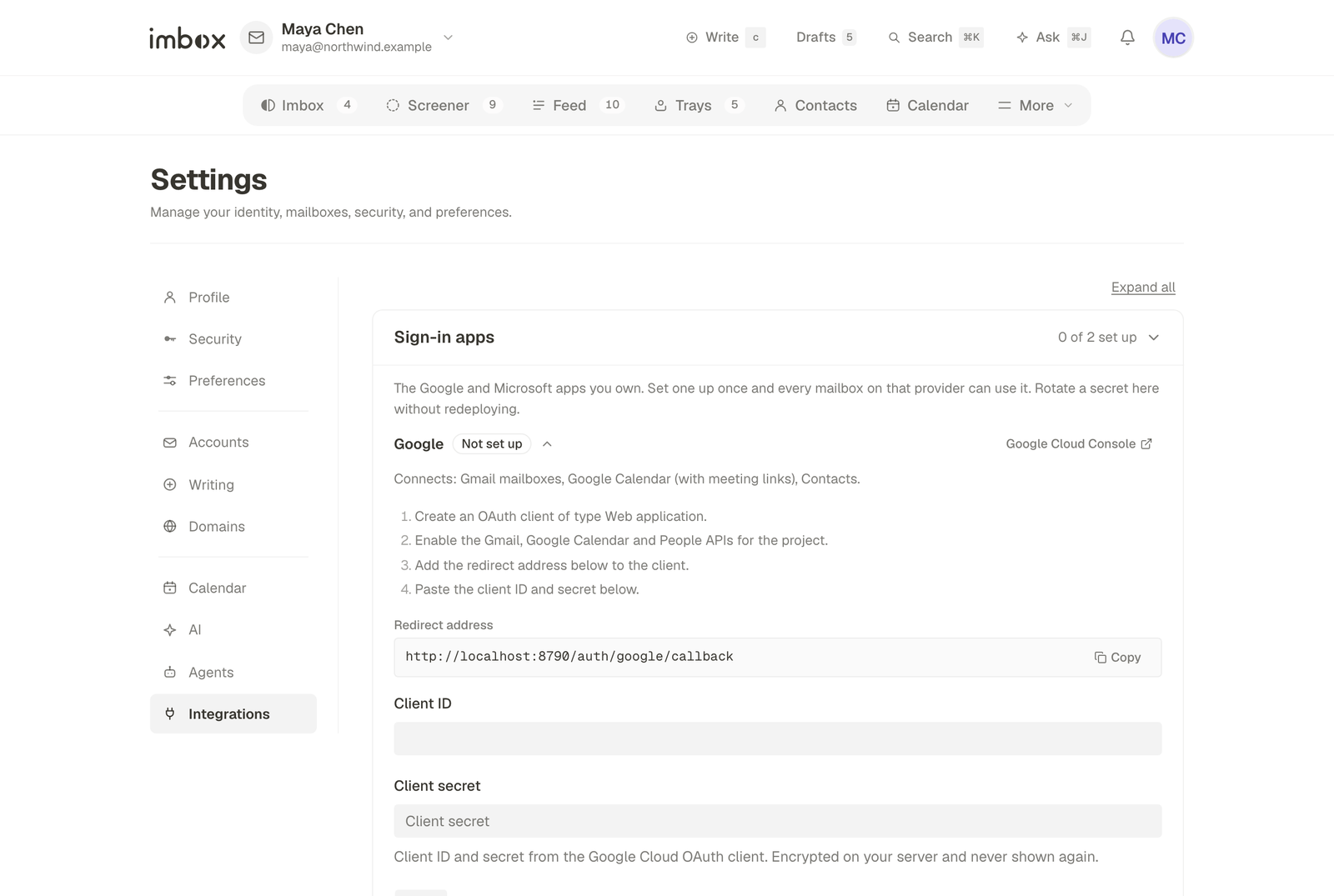
You need a Google sign-in app. This is a one-time setup.
- Open the Google Cloud console and create a project.
- Under APIs and Services → Library, turn on Gmail API and People API. Turn on Google Calendar API too if you want the calendar.
- Under OAuth consent screen, choose External. Add your Gmail addresses as test users. Publishing the app later removes Google's 7-day limit on test sign-ins.
- Under Credentials, create an OAuth client ID of type Web application:
- Authorized JavaScript origin:
https://YOUR_ADDRESS - Authorized redirect URIs:
https://YOUR_ADDRESS/auth/google/callback, andhttp://localhost:8787/auth/google/callbackfor local use
- Authorized JavaScript origin:
- Set
GOOGLE_CLIENT_IDandGOOGLE_CLIENT_SECRET(see Configuration), or save them under Settings → Accounts → Provider credentials. - Open the sidebar and choose Connect Gmail.
The scopes asked for are gmail.modify, the contacts scopes (contacts.other.readonly, contacts.readonly, directory.readonly), and openid, email and profile. Calendar access is asked for separately from Settings → Calendar, so connecting mail alone never touches your calendar.
Outlook
Microsoft turned off password sign-in for IMAP, POP and SMTP on 16 September 2024, and removed app passwords with it. An Outlook mailbox can only be connected through Microsoft's own sign-in. Imbox uses Microsoft Graph for this.
If you sign in to the Azure portal with a personal Microsoft account, you land in a shared tenant that cannot register apps. You will see the error AADSTS16000, or 401 No access on the App registrations page. Create a directory of your own first (Microsoft Entra ID → Manage tenants → Create), then switch into it.
- Go to Entra ID → App registrations → New registration.
- For Supported account types, choose accounts in any directory and personal Microsoft accounts. This lets both
@outlook.comand work accounts sign in. - Add a Web redirect URI:
https://YOUR_ADDRESS/auth/microsoft/callback, andhttp://localhost:8787/auth/microsoft/callbackfor local use. - Under Certificates and secrets, create a client secret and copy the Value column straight away. It is shown once. The Secret ID column is not a credential.
- Under API permissions → Microsoft Graph → Delegated, add
Mail.ReadWrite,Mail.Send,User.Readandoffline_access. Withoutoffline_access, syncing stops after about an hour. You do not need admin consent. - Set
MS_CLIENT_IDandMS_CLIENT_SECRET, then choose Connect Outlook in the sidebar.
Microsoft client secrets expire, at most after 24 months. Create the new secret first, switch Imbox to it, then delete the old one. Connected mailboxes keep working, because the secret identifies your app, not your mailbox.
IMAP and SMTP
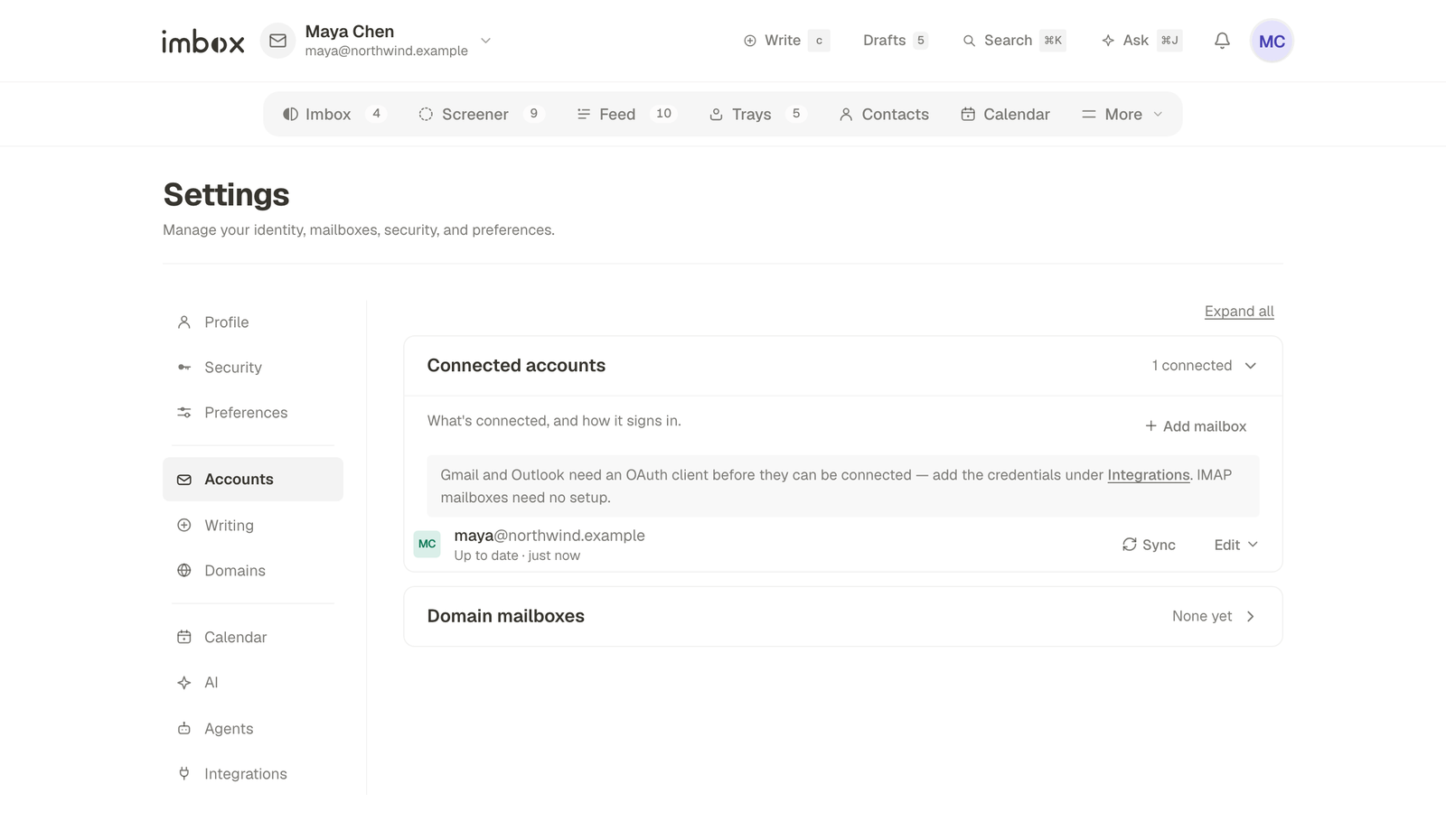
Go to Settings → Accounts → Add mailbox. Choose a provider or type the server names, and give an app password where the provider offers one. Imbox logs in to both servers before it saves anything, so a typo never leaves a half-connected account.
- IMAP: port 993, with TLS.
- SMTP: port 465 (TLS) or 587 (STARTTLS).
- Port 25 is for mail between servers and is not used. Use 465 or 587.
Passwords are stored encrypted and are never sent back to the browser.
| Provider | IMAP server | SMTP server | Notes |
|---|---|---|---|
| Fastmail | imap.fastmail.com | smtp.fastmail.com | Make an app password under Settings, Privacy and Security |
| Migadu | imap.migadu.com | smtp.migadu.com | |
| Zoho, personal | imap.zoho.com | smtp.zoho.com | For @zohomail.com addresses |
| Zoho, own domain | imappro.zoho.com | smtppro.zoho.com | Organization accounts use the pro names |
| cPanel | usually mail.yourdomain.com | usually mail.yourdomain.com | Check your host's control panel |
Zoho's free plan cannot be connected at all. It has no IMAP. On a Zoho data centre outside the US, change the ending of the server name to .eu, .in or .com.au.
Change a password or a server. Use Server settings on the mailbox. Both servers are checked before saving, and your mail is kept. Leave the password empty to change only a host or port.
If the login stops working, the mailbox is marked disconnected instead of being retried every minute. Saving working details brings it back.
Domain mailboxes
An address on a domain you own, with a mailbox created in Imbox under Settings → Domains. Where the mail comes in from depends on what hosts the domain:
-
A Stalwart server you run. Connect it under Settings → Domains and mail is received and sent through it. See Stalwart. This is the supported way.
-
Any mail server that can forward by HTTP. Add the domain under Settings → Domains → Behind my mail server; the page lists the steps and turns Active when the first message arrives. Set
INBOUND_SECRET(create it withopenssl rand -hex 32), restart, and send each message for the domain toPOST /inbound/mail?to=<recipient>&from=<sender>with the raw message as the body and the headerAuthorization: Bearer <INBOUND_SECRET>. The answer tells the mail server what to do:202means done (stored, or already had it),404means no such mailbox and413means too large (both final, so it should bounce), and503means try again later. WithoutINBOUND_SECRETthe endpoint does not exist.curl -X POST "https://mail.example.com/inbound/[email protected]&[email protected]" \ -H "Authorization: Bearer $INBOUND_SECRET" -H "Content-Type: message/rfc822" \ --data-binary @message.emlWith Postfix, a pipe transport that runs the same
curlwith--data-binary @-andto=$RECIPIENTdoes it; a deferred exit code makes Postfix retry. -
Sending. Set
RESEND_API_KEYand verify the domain in Resend. Without it, a domain mailbox cannot send unless it has a Stalwart server behind it.
Import older mail
Connecting an IMAP or Stalwart mailbox lets you import its latest 25, 50, 100 or 200 messages. Later, use Re-sync on the mailbox:
| Choice | What it does |
|---|---|
| Check for missing mail | Looks at the latest 200 messages |
| The latest 1,000 messages | Imports up to 1,000 |
| Everything in the inbox | Imports every message on the server |
Re-sync never deletes anything. Mail you already have is matched by its Message-ID and skipped, so nothing appears twice.
A re-sync runs in the background, in steps a minute apart, so it never holds up the rest of the app. The mailbox shows its progress ("Importing mail, 1,240 of 9,800") under Settings → Accounts. If the server stops answering, Imbox waits a few minutes and tries again, with longer waits each time. Pressing Sync tries at once. A message larger than 30 MB is skipped and noted in the mailbox's sync log. It stays on the server.
If something goes wrong
Nothing appears after you connect, a mailbox shows a sync problem, or Google or Microsoft refuses the sign-in: see Mailboxes and sending.
Next
- The Screener: where the first message from every sender waits.
- Calendar: sync Google, Microsoft or CalDAV calendars.
- AI assistant: draft and summarise with your own key.