

The first message from anyone new stops in the Screener. Nothing from them reaches your Imbox until you say so. You decide once per sender, and the decision holds for every mailbox you have connected.
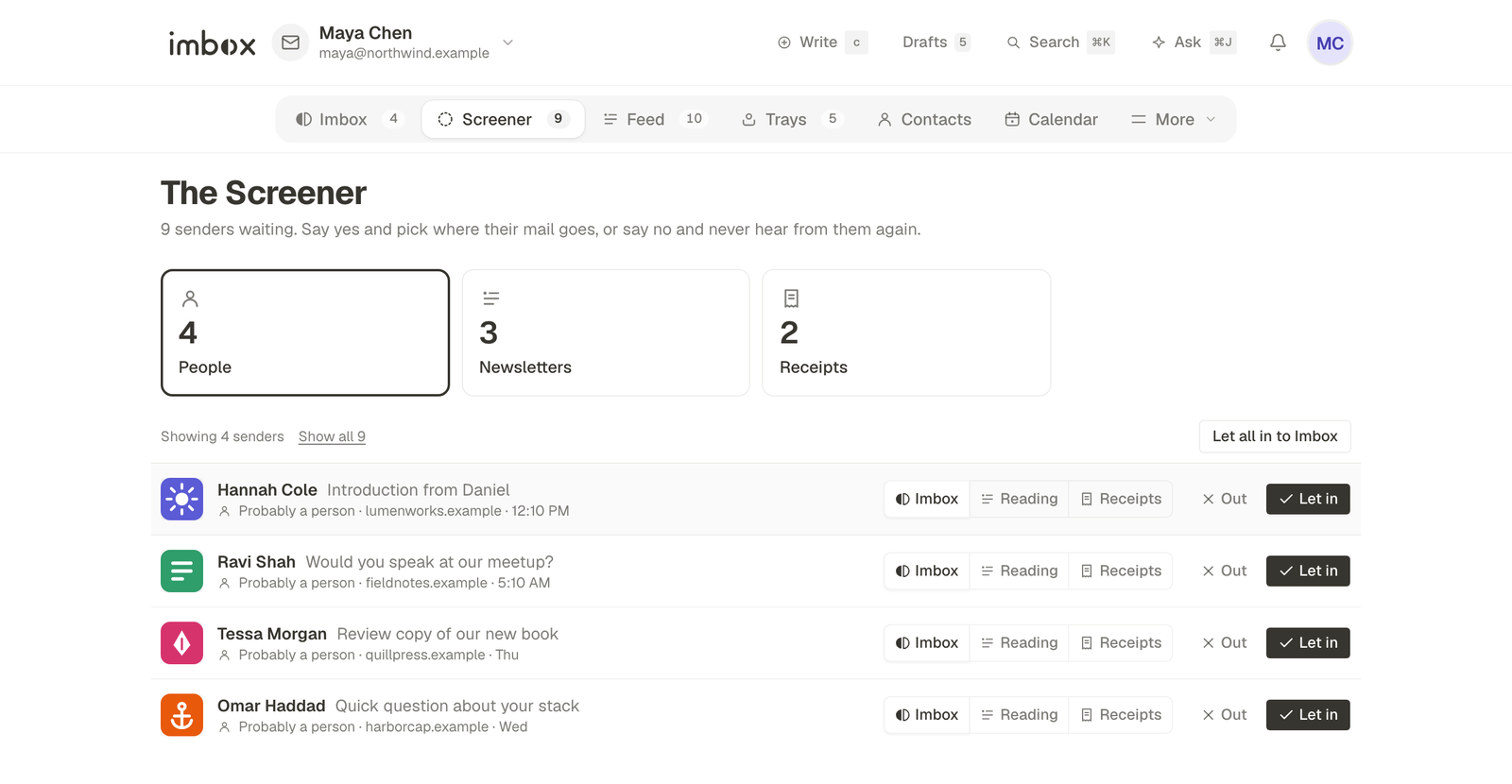
Open it from the Screener tab. The number beside the tab is how many senders are waiting.
How a message finds its place
What you decide
For each sender you choose one of two things.
- Let in. Pick where their mail goes from now on: the Imbox, Reading (newsletters and articles you read at leisure), or Receipts (confirmations, invoices, alerts). The choice sits next to the sender as three small buttons, labelled Imbox, Reading and Receipts.
- Screen out. Their mail is dropped quietly from now on. They are not told, and you can change your mind later.
A message from someone you have already decided about never comes here. It goes straight to the place you chose.
Sorting a long list
When many senders are waiting, they are grouped into cards at the top of the page. Each card shows a count, and choosing one narrows the list to that kind.
| Card | What it holds |
|---|---|
| People | Senders with no sign of being a list or a service. |
| Newsletters | Senders whose mail looks like a mailing list. |
| Receipts | Senders whose mail looks like a receipt, a notice or an alert. |
| Suggested out | Senders the AI assistant suggests screening out. Shown only when your assistant is set up and has any. |
Each group has buttons for deciding the whole group at once, such as Let all in to Imbox or Screen all out. imbox asks you to confirm first and tells you how many senders it applies to.
The page shows the first batch. Show all loads the rest of that group.
Let obvious people in
If you turn on Let obvious people in in your settings, imbox lets in people it can already tell you know, such as someone you have written to before. They go straight to the Imbox, and the Screener lists them at the top with a reason for each. Undo puts one back in the Screener to decide yourself. Got it clears the list.
Changing your mind
Screened-out senders are kept, not deleted. A strip at the bottom of the Screener shows how many there are, and Review opens the full list. From there, or from Contacts, you can let any of them back in.
With the keyboard
| Key | Does |
|---|---|
j and k | Move down and up the list |
y | Let the sender in |
n | Screen the sender out |
1 and 2 | Choose Imbox or Feed as the destination |
Press ? anywhere in imbox to see every shortcut.
If nothing is waiting
You will see "Nobody at the door." That is the normal state once you have been through your first few days. If you expect a sender to be here and they are not, check Contacts first, because you may have decided about them already.
Next
- Imbox, Feed and Receipts: where mail lands after you decide.
- Contacts: change a decision later.
- Browser extension: decide from any tab.